
How Voice-Activated Teleprompting Works
Traditional teleprompters scroll at a fixed mechanical speed. If you slow down to emphasize a point or answer an audience question, the text rolls away; if you speed up, you run out of text.
E Teleprompter's AI Voice Flow Engine solves this with real-time, zero-lag acoustic and phoneme synchronization:
- Dual-Channel Unicode & Phonetic Alignment: Combines direct Unicode letter matching with normalized Latin phonetic transliteration. Accurately tracks English, Devanagari Hindi, Sanskrit, and multilingual scripts with full combining mark support.
- 2-Step Sequential Consecutive Jump Verification: When you deliberately re-read an earlier line above or skip ahead, the system stages candidate words and smoothly glides only when 2 consecutive words match.
- Reverse Step-by-Step Word Highlighting: If you repeat a previous sentence, the active word glow steps smoothly backward into the repeated phrase.
- Zero-Drift Synchronized Pauses: When you pause for breath, scrolling halts instantly. Ambient room noise is isolated with dynamic stop floor gating.
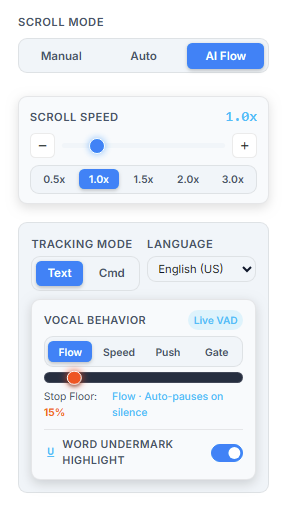
4 Intelligent Vocal Energy Modes
Tailor the speech tracking physics to your specific recording format:
1. Continuous Flow
Standard studio mode. Glides smoothly while you speak and decelerates cleanly into stationary hold the moment you pause.
2. Dynamic Speed
Loudness-scaled velocity. Raising your vocal projection smoothly accelerates scroll speed from 0.65x up to 2.2x.
3. Vocal Push
Advances forward in smooth spring line increments per vocal sentence burst — perfect for keynote pauses and bulleted slides.
4. Strict Noise Gate
High-discipline studio noise gate with an aggressive 180ms cutoff for instant, binary stops in noisy environments.
Devanagari Hindi & Multi-Lingual Auto-Detection
E Teleprompter analyzes pasted script content in real time. If 60% or more of your script contains Devanagari characters (Hindi, Sanskrit, Marathi), the speech engine automatically switches to Hindi acoustic recognition (hi-IN), while retaining manual override options in the sidebar.
Touchless Studio Controls: Ultrasonic Remote & AI Gesture Vision
In addition to script tracking, E Teleprompter features two powerful touchless control options so presenters never have to touch a mouse or keyboard during a live take:
- Ultrasonic Wireless Remote (/remote): Transform any smartphone into a wireless presentation clicker using high-frequency near-ultrasonic sound waves (16.6–18.6 kHz). No Bluetooth pairing, no Wi-Fi network joining, and zero app installs required.
- MediaPipe AI Hand Gesture Vision: Control scrolling using simple hand signs detected by your camera — hold up a Peace Sign (✌️) to pause, Rock On (🤟) to resume, or Point (👆/👇) to smoothly scroll.
- 100% Client-Side Privacy: Both ultrasonic audio detection and camera gesture vision execute locally in your browser. Zero audio, video, or keystrokes ever leave your computer.
Why Creators & Speakers Love AI Voice Flow
Natural Delivery
Speak with authentic emotion, pauses, and impromptu asides without fighting a rigid timer.
Seamless Re-Reading
Jump back up to re-take any sentence without stopping playback — confirmed by 2 consecutive spoken words.
100% Local Privacy
Microphone audio is processed entirely in your local browser session with zero cloud transmission.
How to Enable Voice Flow in E Teleprompter
- Open the E Teleprompter Studio.
- In the sidebar, locate the Scroll Mode toggle and select "AI Flow".
- When prompted by your browser, grant microphone access.
- Press Spacebar or click Play and start speaking — the teleprompter will follow your voice automatically!