
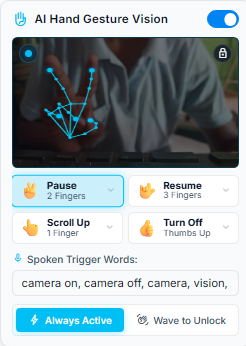
With the AI Hand Gesture Vision plugin enabled, your computer’s webcam tracks 21 skeletal hand coordinates at 30 frames per second:
- ✌️ Peace Sign: Instantly pause scrolling when taking a breath or answering questions.
- 🤟 Rock On / Horns: Smoothly resume teleprompter scrolling.
- 👆 Point Up: Smoothly roll the script upward.
- 👇 Point Down: Advance the script downward.
- 👍 Thumbs Up: Turn off webcam tracking and release camera hardware.
- 100% Private: Executed completely in your browser via WebGL. No video is ever saved or transmitted.
1. Why Touchless Control Matters in Video Production
During a solo video shoot, moving away from your mark to reach for a computer mouse breaks your framing, disrupts eye contact, and produces noticeable body shifts that require tedious post-production editing.
With E Teleprompter’s AI Hand Gesture Vision, you stay anchored in front of your camera. When you need to pause or scroll, simply raise your hand inside your natural camera frame, execute the gesture for 300ms, and lower your hand. Your take continues seamlessly.
2. Intuitive Touchless Studio Gestures
Rather than reaching across your desk to hit the Spacebar while recording, you can control the teleprompter with simple, natural hand gestures in front of your webcam:
- ✌️ Peace Sign (Pause): Raise two fingers to pause prompter scrolling immediately.
- 🤟 Rock On (Resume): Flash the horn sign to resume smooth scrolling.
- 👆 Point Up (Scroll Up): Point upward to smoothly glide back to earlier lines.
- 👇 Point Down (Scroll Down): Point downward to advance forward.
- 👍 Thumbs Up (Turn Off): Give a thumbs up to instantly turn off the camera and release your webcam.
3. Smart Accidental Gesture Protection
Presenters naturally talk with their hands. To prevent accidental triggers during normal conversation, E Teleprompter uses intelligent gesture confirmation:
- Steady Hold Verification: A gesture must be held steadily for a fraction of a second before the action fires. Rapid hand movements or expressive speaking gestures will never cause accidental pauses.
- 100% Private & Local: Your webcam video stays strictly in your computer's browser memory. Zero images, video streams, or facial data are ever saved, stored, or sent to the cloud.
- Optimal Distance: Works best when seated or standing between 2 and 6 feet from your webcam with standard room lighting.
4. The "Wave to Unlock" Standby Architecture
One major challenge with video teleprompting is resource consumption. Running a continuous 30fps vision model while delivering a 40-minute lecture can warm up your laptop and spin fans (which your microphone might pick up!).
To solve this, E Teleprompter features an optional "Wave to Unlock" Standby Mode:
- In Standby, the camera runs at a lightweight 5 frames per second, checking solely for a waving hand.
- When you wave across the lens, the engine "wakes up" to full 30fps mode for 5 seconds, allowing you to execute a command.
- If no further gestures occur, it returns to sleep, keeping CPU usage below 3%.
4. Studio Best Practices: Lighting, Distance & Angle
Frontal Key Light
Ensure your face and hands are lit from the front. Avoid harsh backlights or bright windows behind you that silhouette your fingers.
Distance Sweet Spot
Position yourself between 2 and 6 feet (0.6–1.8 meters) from your webcam. Your hand should occupy at least 15% of the frame height when raised.
Chest-Level Framing
Raise your hand to upper-chest or shoulder height so the camera has a clear, unobstructed line of sight.
5. 100% Client-Side Privacy Guarantee
We treat privacy with zero compromise. Unlike cloud-based AI tools that upload video feeds to remote servers for processing:
- Zero Remote Uploads: Every single camera frame is processed in volatile memory via WebGL directly on your graphics card.
- Zero Disk Storage: Video streams are discarded immediately after landmark estimation.
- Instant Camera Release: You can click the toggle or use the Thumbs Up (👍) gesture to kill webcam permissions and turn off the sensor instantly.
6. Combining Gestures with Ultrasonic Mobile Remote & Voice Flow
E Teleprompter allows you to mix and match all studio plugins:
- Ultrasonic Remote (Read Guide): Keep your phone beside your laptop or in your palm. Hold buttons on /remote for smooth continuous scrolling over near-ultrasound pulses.
- AI Voice Flow (Read Guide): Let your voice drive the primary scroll speed, and use the Peace sign (✌️) only when you want to take an unexpected pause.
- Beam-Splitter Glass Mirroring (Read Guide): Flip the prompter display for physical glass hoods while camera tracking continues looking directly through the glass.
Experience Touchless Video Prompting
Activate AI Hand Gesture Vision right now in your browser without software installation.
videocam Open Studio & Enable Vision