
Traditional teleprompters scroll at fixed mechanical speeds, forcing presenters to race against or lag behind their text. The E Teleprompter Speech-to-Text Engine synchronizes scrolling dynamically with your vocal chords:
- Dual Engine Support: Google Web Speech API (multilingual) and Moonshine AI (100% on-device WASM).
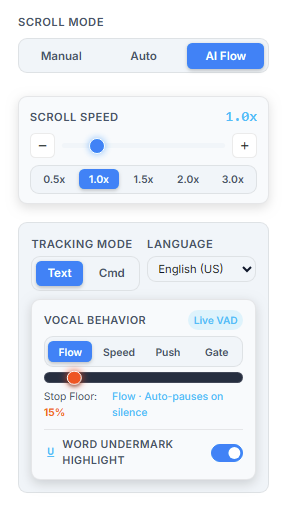
- 4 Vocal Energy Modes: Continuous Flow, Dynamic Velocity, Vocal Push, and Strict Gate.
- 2-Step Consecutive Jump Verification: Eliminates false skips caused by speech homophones.
- Devanagari Auto-Detection: Automatically configures Hindi
(
hi-IN) when ≥60% Devanagari text is pasted.
1. The Problem with Fixed-Speed Scrolling
Anyone who has recorded a video presentation knows the anxiety of a traditional teleprompter. If you pause to emphasize a key takeaway, let laughter settle, or take a breath, the prompter continues scrolling off-screen. If you speak faster during an exciting point, you run out of visible lines.
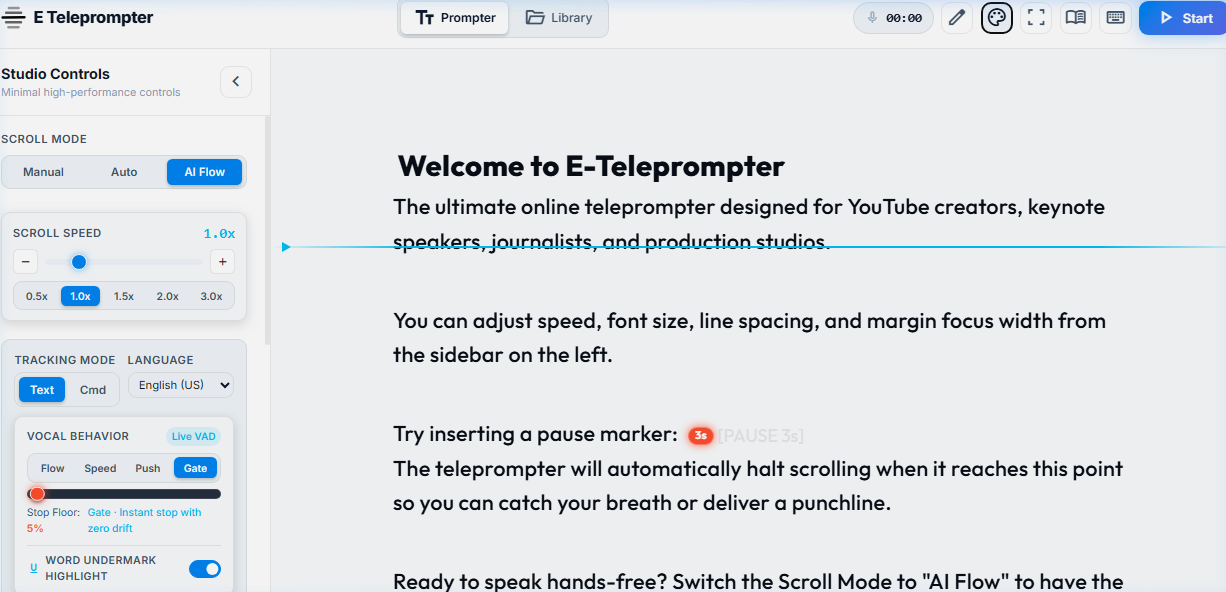
E Teleprompter solves this fundamentally through Voice Flow: an intelligent audio-visual feedback loop that tracks your spoken words in real time and adjusts the viewport position so your active sentence remains locked to the Eye Contact Guide Horizon.
2. How Voice Flow Works in Practice
Traditional teleprompters scroll at a fixed timer speed. If you pause to emphasize an important point, laugh, or take a breath, the prompter continues scrolling away. If you speak faster, you run out of visible lines.
Voice Flow turns this dynamic on its head: your voice is the engine. The prompter listens to your speech and keeps your active sentence anchored directly to your eye level. When you stop talking, scrolling stops instantly. When you resume, it glides forward naturally.
3. The Dual-Engine Architecture
E Teleprompter features a modular speech architecture managed through our in-studio Plugin Hub:
A. Google Web Speech API (Broad Multilingual Coverage)
Built directly into Chromium browsers (Google Chrome, Microsoft Edge, Brave, Opera). It connects directly to real-time speech acoustic decoders with sub-200ms latency. In our studio, you can selectively install and activate language packs:
- English (US / UK): Standard broadcast presentation grammar.
- Hindi (
hi-IN): Full Devanagari script support with phoneme transliteration. - Spanish (
es-ES), French (fr-FR), German (de-DE): Native acoustic dictionaries.
B. Moonshine AI Speech Recognition (100% On-Device WASM)
For presenters with strict non-disclosure agreements, legal depositions, or broadcast security constraints, we offer the Moonshine AI WASM plugin. Moonshine executes an ONNX neural network entirely inside your browser's WebAssembly and WebGPU/WebGL runtime. Zero bytes of audio ever leave your computer.
3. The 4 Vocal Energy Modes Explained
Speakers have different cadences. A formal keynote requires steady, smooth flow, while an energetic tech keynote or podcast features sudden volume changes and laughter. You can select your mode from the Vocal Energy Mode segmented control in the studio sidebar:
1. Continuous Flow
The default studio mode. The teleprompter scrolls continuously while you speak and halts the instant you pause. Ideal for scripted YouTube videos and educational courses.
2. Dynamic Speed
Vocal projection modulates scroll velocity between 0.65x and 2.2x. When you raise your voice for emphasis, the text accelerates smoothly; as you whisper, it decelerates.
3. Vocal Push
Advances your script in discrete, sentence-sized increments each time a completed phrase is recognized. Perfect for telemarketers, news anchors, and stage keynote addresses.
4. Strict Noise Gate
Implements a rapid 180ms cutoff binary gate. Only spoken phonemes that break through the ambient noise threshold will trigger scrolling. Ideal for noisy studios or open stages.
4. Smart Jump Protection: Never Lose Your Place
The most common flaw in standard speech prompters is accidental skipping. If your script contains the word "and" or "the" multiple times, a basic speech recognizer might hear one common word and jump forward 500 words prematurely!
To prevent accidental jumps, E Teleprompter uses a simple and reliable 2-Step Consecutive Word Rule:
- Step 1 (First Word Candidate): When you speak a word outside your current reading line, the prompter notes your speech without jumping.
- Step 2 (Confirmation): As soon as your second consecutive word matches that sentence, the prompter confirms your intent and smoothly glides to that line.
- Seamless Retakes: If you flub a line, simply pause for a second and start speaking the first two words of the previous sentence. The prompter glides back up to your retake point automatically!
If you flub a line while recording a YouTube video, simply pause for 1 second and say the first two words of the previous sentence. E Teleprompter will automatically scroll backward to your retake point without requiring keyboard intervention!
5. Devanagari Hindi & Multilingual Auto-Detection
Multilingual creators often switch between English and Hindi during presentations. E Teleprompter features a script character scanner:
-
Whenever you paste or type script text, the editor calculates the
ratio of Unicode Devanagari code points (
U+0900toU+097F). -
If 60% or more of the script consists of Devanagari characters,
the speech recognition pipeline automatically switches to Hindi (
hi-IN). - If Latin script is used (English or Hinglish transliteration), phonetic matching ensures seamless alignment with English acoustic models.
6. Step-by-Step Tutorial: Calibrating Your Audio VAD
Follow these four steps to calibrate your microphone for studio recording:
- Select Your Input Device: In the sidebar under Media Devices, choose your primary microphone (e.g. Rode NT-USB, Shure SM7B, or Elgato Wave).
- Set Speaking Scroll Mode: Click the AI Flow segmented pill in the sidebar or press hotkey 1.
- Observe the Live VAD Meter: Speak naturally at your intended presentation volume. Ensure the green audio signal bar cleanly crosses the sensitivity marker.
- Set Column Focus Width: Choose 60% or 75% column margin to maintain direct eye contact with the camera lens.
7. Touchless Control: Combining Voice with Ultrasonic Remote & Gestures
Voice Flow pairs seamlessly with our other touchless studio plugins:
- Ultrasonic Acoustic Remote (Read Guide): Open /remote on your smartphone. You can hold to scroll up/down, reset to top, or pause prompting using near-ultrasound pulses without Bluetooth pairing.
- AI Hand Gesture Vision (Read Guide): Use webcam hand signs (✌️ Pause, 🤟 Resume, 👆 Scroll) when you want to take a break without speaking.
- 70/30 Beam-Splitter Glass (Read Guide): Flip text horizontally for reflective glass hoods and switch to the OLED Cinema theme for pure optical black.
Ready to Try Hands-Free Speech Flow?
Experience zero-lag voice tracking in your browser right now — 100% free, no login required.
mic Launch AI Voice Studio