
Physical teleprompters place a specialized 70/30 beam-splitter glass plate at a 45° angle directly in front of your camera lens:
- 70% Transmission: 70% of light passes straight through the glass into your camera sensor with zero color cast or exposure degradation.
- 30% Reflection: 30% of light reflects from your horizontal prompter screen directly into your eyes.
- Optical Inversion: Reflecting text in a mirror reverses it horizontally — requiring Horizontal Mirror Mode (Hotkey: M) in software.
- OLED Cinema Theme: Pitch-black backgrounds (
#000000) ensure unlit pixels emit zero light, preventing ghosting on the glass.
1. Why Broadcast Studios Use Beam-Splitter Glass
When you watch television news or presidential addresses, the presenter appears to look straight through the screen directly into your eyes with unwavering confidence. They aren't memorizing thousands of words; they are looking directly down the barrel of the camera lens through a beam-splitter glass hood.
E Teleprompter is fully engineered to power physical beam-splitter rigs from your tablet, laptop, or second monitor with instant hardware flipping.
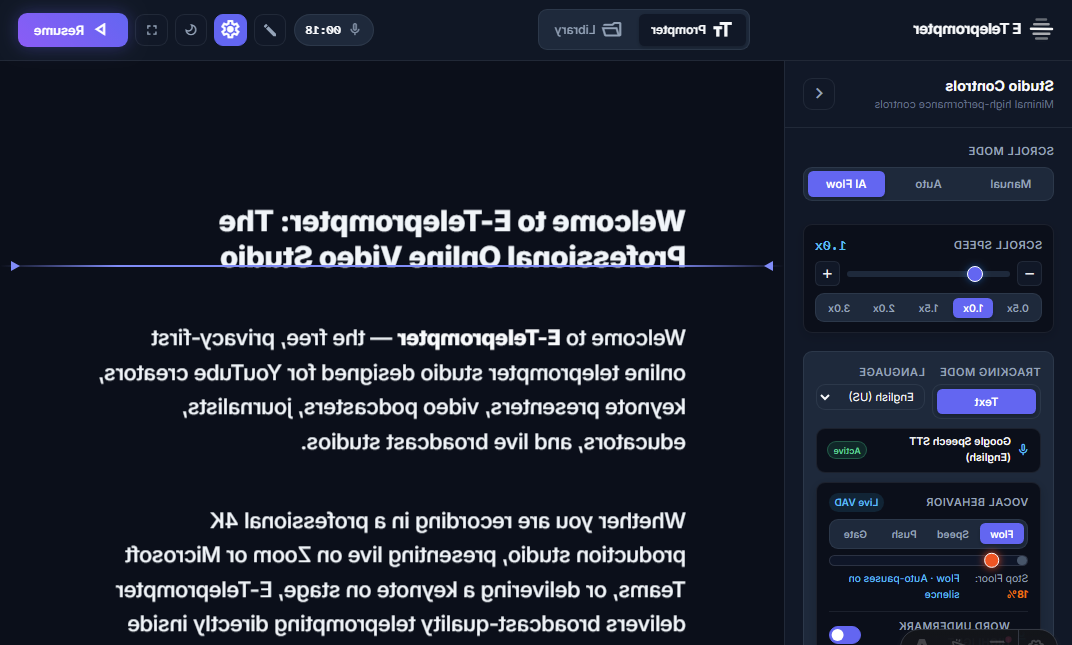
2. Understanding Horizontal & Vertical Mirroring
Because light reflecting off a 45° glass plate creates a mirror image, regular text appears reversed (backward). In E Teleprompter, you can toggle mirroring modes in the sidebar or cycle with hotkey M:
Mirror Horizontal (Standard Glass)
Inverts the prompter text along the vertical axis (scaleX(-1)). Used by 95% of beam-splitter glass rigs where the tablet or
monitor rests horizontally beneath the glass.
Mirror Vertical
Inverts the prompter along the horizontal axis (scaleY(-1)). Used in top-mounted studio rigs where the display hangs inverted
above the lens.
Dual Flip (H + V)
Combines horizontal and vertical inversion for specialized dual-prism optical systems and upside-down monitor brackets.
3. The OLED Cinema Theme: Why Pitch Black Matters
A common issue with home teleprompter setups is glass ghosting and contrast washout. Standard dark themes use dark
gray backgrounds (e.g. #1e293b). On standard LCD tablets,
that gray background emits backlighting into the glass hood, creating a
foggy glare that degrades camera contrast.
To solve this, E Teleprompter includes a dedicated OLED Cinema Theme:
- Pitch-Black Background (
#000000): On OLED screens, black pixels are completely powered off, emitting exactly 0 candelas of stray light. - Bold Geometric Typography (
Outfit, 700 weight): Ensures clean, legible glyphs even through 70/30 glass reflection. - High-Contrast Neon Cyan Accents (
#00f0ff): Provides vivid reading guidance without bleeding light into the camera lens.
4. Hardware Rig Compatibility Guide
E Teleprompter is compatible with all leading hardware teleprompter glass systems:
- Glide Gear (TMP 100, TMP 500): Professional 70/30 glass hoods supporting 10-inch to 13-inch tablets or portable monitors.
- Neewer (X14, X17 Rigs): Popular creator rigs with quick-release tripod mounts and remote brackets.
- Padcaster & Prompter People: Enterprise broadcast rigs used by universities and television networks.
5. Camera Lens Positioning & Focal Length Recommendations
- Focal Length Sweet Spot (35mm to 85mm): Avoid wide-angle lenses (wider than 28mm full-frame equivalent), as the teleprompter hood frame may vignette in the corners of your video. A 50mm or 85mm lens creates natural compression and isolates you cleanly.
- Center the Lens: Position your camera lens directly in the center of the dark fabric shroud. Use the drawstring or velcro to seal any ambient light from entering behind the glass.
- Narrow Column Width (60%): In E Teleprompter’s sidebar, set Focus Width to 60%. This confines your text to a narrow central column, so viewers never see your pupils move left and right while reading.
6. Controlling Your Glass Rig Hands-Free
Once your camera is mounted inside a teleprompter hood, touching your laptop disrupts framing. Use our touchless controls:
- Mobile Ultrasonic Remote (Read Guide): Open /remote on your smartphone. You can trigger horizontal glass mirror mode or hold to scroll without touching the rig.
- AI Voice Flow (Read Guide): Let speech recognition automatically advance your mirrored text as you speak.
- AI Hand Gestures (Read Guide): Hold up a Peace sign (✌️) to pause your mirrored prompter touchlessly.
Set Up Your Glass Rig Now
Launch E Teleprompter in full-screen mirrored mode with zero software downloads.